

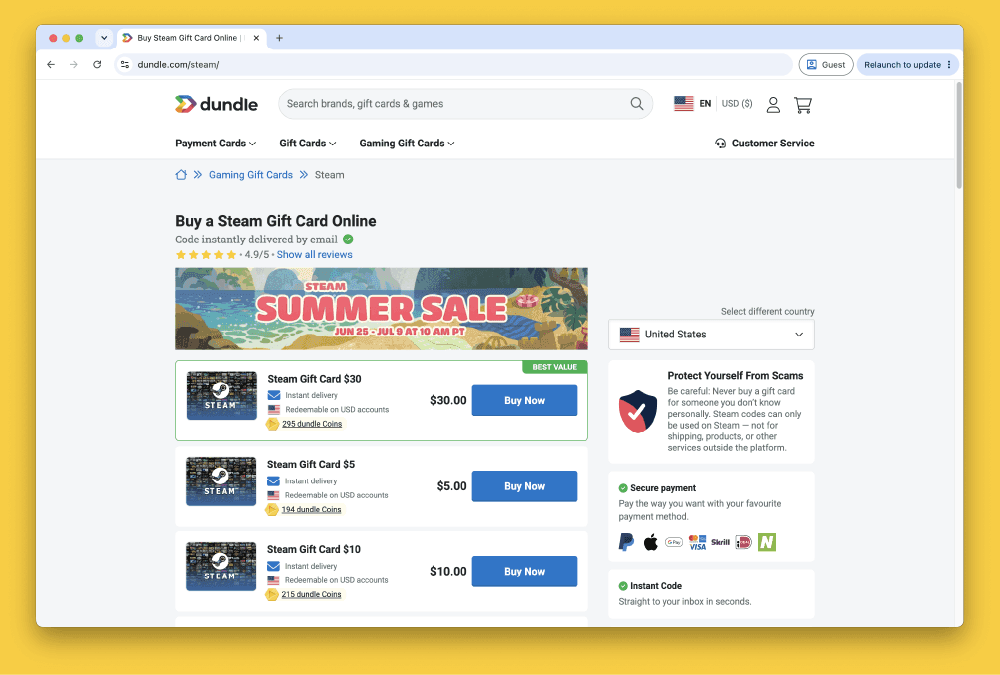


How to Buy Steam Gift Cards from Dundle in Europe
Selected Resellers
We selected resellers often used by our users to purchase Steam.


















How Dundle Works for Buying Steam Credit
Dundle sells Steam Wallet gift card codes in euro denominations that you purchase and then redeem on your Steam account. Rather than paying directly on Steam's store, you choose a code on Dundle, pay using any of 15+ supported payment methods, and enter the code at Steam to add the balance to your Wallet.
Delivery is fully digital: your 15-character Steam code appears on-screen immediately after checkout and is emailed to the address you provide. No Dundle account is required: guest checkout takes only an email address.
Dundle accepts 15+ payment methods at checkout, including PayPal, Klarna, iDEAL (Netherlands), Bancontact (Belgium), EPS (Austria), Visa, Mastercard, Apple Pay, Google Pay, Skrill, and CashLib. Availability depends on the country linked to your payment account.
Is Dundle Safe for Buying Steam Gift Cards?
Dundle is a legitimate gift card reseller registered in the Netherlands (KvK 69094438). Trustpilot score: 3.8 / 5. Most orders complete without issues. The most common complaint is identity verification on first-time or higher-value purchases, which can hold a code for several hours.
| | Dundle | Steam Store |
|---|---|---|
| Payment methods | 15+ (PayPal, Klarna, iDEAL, Bancontact) | Card only |
| EUR wallet compatibility | EUR, PLN, NOK, SEK | Multiple currencies |
| Fee above face value | €1–€3 | None |
| Delivery | Instant on-screen | N/A |
| ID verification | Possible on first order | Not required |
| Countries | 35+ European countries | Global |
Step-by-Step: Buying Steam Credit from Dundle
Step 1: Go to Dundle and find Steam gift cards
Navigate to dundle.com and search for "Steam" or browse to the Steam gift card section. Dundle stocks EUR Steam Wallet codes in several denominations.
Step 2: Select a denomination
Choose the amount to add to your Steam Wallet: €5, €10, €20, €25, €50, or €100. Dundle's listed price includes a service fee of approximately €1–€3 over the denomination, shown clearly at checkout before you confirm (Dundle, 2026).
Step 3: Choose a payment method and complete checkout
Click "Buy Now" to open the checkout. Select your preferred payment method: PayPal, Klarna, iDEAL, Bancontact, Visa, Mastercard, Apple Pay, and Google Pay are the most commonly used options for European buyers. Complete the payment steps. Guest checkout is available: enter your email address and no account registration is needed.
Step 4: Receive your Steam code
Your Steam Wallet code appears on-screen immediately after payment is confirmed. Dundle also emails the code to the address you entered. Copy or save the code before closing the confirmation page.
Step 5: Redeem the code on Steam
Open the Steam desktop client or visit store.steampowered.com and sign in. Go to your account details and click "Add funds to your Steam Wallet." Enter the 15-character code and confirm. The balance is applied to your Steam Wallet immediately.
Fees, Limits, and Availability
Dundle's listed price for each Steam card includes a service fee of approximately €1–€3 over face value, shown at checkout before you confirm (Dundle, 2026). Payment method fees may apply on top: Skrill and Neteller add around 3%, while iDEAL and Bancontact carry no additional processing fee.
Dundle operates in 35+ European countries, including Germany, Austria, Switzerland, France, Belgium, the Netherlands, Spain, Italy, and Poland. Available payment methods vary by country.
Per-transaction limits are not published, but Dundle applies progressive spending caps that increase over time. Start with a smaller denomination if you are buying from Dundle for the first time.
Frequently Asked Questions
Selected Resellers

AI-generated. Written and published by our research agent. No human editor reviewed this page before it went live. Tell us if something here is wrong and we will correct it.
Related Articles
How to Buy Steam Wallet Credit with Sofort in Europe

How to Buy Steam Wallet Credit with BLIK in Poland

How to Buy Steam Wallet Credit with Apple Pay in Europe

How to Buy Steam Wallet Credit with a Visa Prepaid Card
How to Buy Steam Wallet Credit with a Mastercard Prepaid Card
How to Buy Steam Wallet Credit from Eneba in Europe
How to Buy Steam Wallet Credit with PayPal in Europe
How to Buy Steam Wallet Credit with Bancontact in Europe
How to Buy Steam Wallet Credit with Paysafecard in Europe
How to Buy Steam Wallet Credit with iDEAL in Europe