

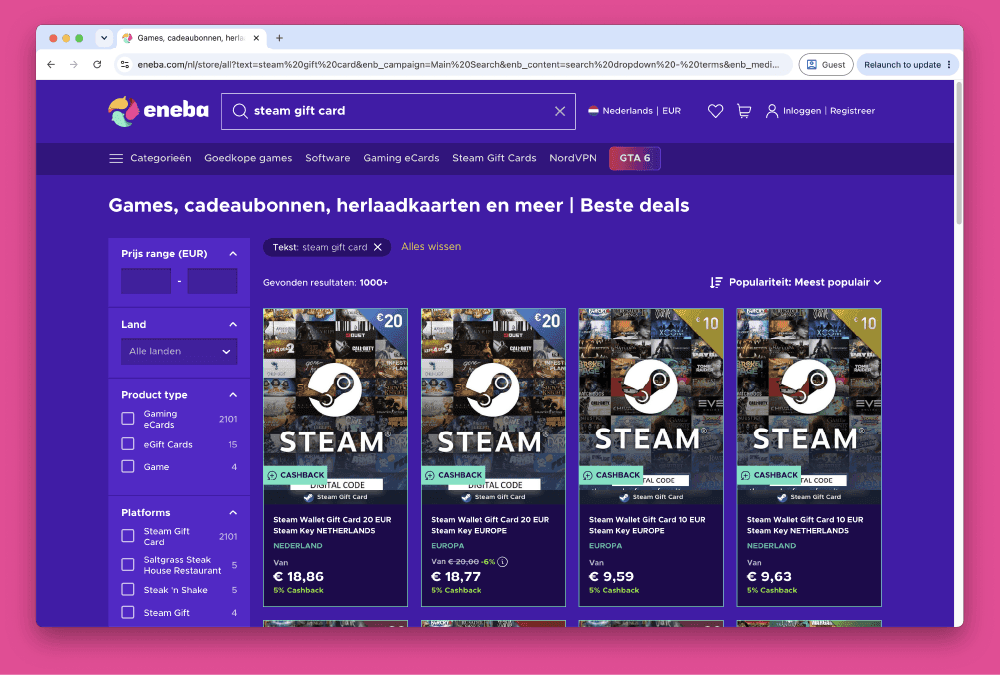


How to Buy Steam Wallet Credit from Eneba in Europe
Selected Resellers
We selected resellers often used by our users to purchase Steam.


















How Eneba Works for Steam Gift Cards
Buying Steam Gift Cards on Eneba means purchasing a redeemable Steam Wallet code from one of the platform's verified third-party sellers. Eneba is a digital marketplace headquartered in Vilnius, Lithuania, founded in 2018, that connects European gamers with thousands of independent sellers. It holds a Trustpilot score of 4.3/5 based on over 282,000 reviews (Trustpilot, June 2026) and offers buyer protection on invalid or already-used keys. When your order is confirmed, the code appears instantly in your Eneba account library, or is sent by email for guest purchases.
Eneba sells region-specific Steam cards: EUROPE, GERMANY, FRANCE, and Switzerland-specific CHF variants. Buying the wrong region key results in an activation error on Steam. Before purchasing, check your Steam account's country setting under Account Details.
Step-by-Step: Buying Steam Wallet Credit from Eneba
The full checkout flow on Eneba takes under five minutes and delivers your code instantly.
Step 1: Go to Eneba's Steam Gift Cards Section
Navigate to eneba.com and search for "Steam gift card," or browse to Gift Cards and filter by platform. You will see a list of available denominations grouped by region.
Step 2: Select Your Region and Denomination
Choose the region that matches your Steam account: EUROPE for most EU countries, GERMANY for a German Steam account, FRANCE for a French account, or the CHF variant for Switzerland. EUR denominations available include €2, €5, €8, €10, €20, €25, €30, €50, and €100. Swiss CHF options run from 5 CHF to 110 CHF.
Step 3: Pick a Seller Offer
Multiple verified sellers often list the same denomination at slightly different prices. Sort by price or seller rating and select the offer that suits you. Seller ratings and review counts are shown on each listing.
Step 4: Add to Cart and Go to Checkout
Click "Buy now" or "Add to cart." On the checkout page, apply a promo code if you have one before selecting your payment method.
Step 5: Select a Payment Method and Pay
Choose from Visa, Mastercard, PayPal, Klarna, Sofort, iDEAL (Netherlands only), Trustly, Paysafecard, Apple Pay, Google Pay, Skrill, and others. A service fee is displayed at this stage before you confirm. Complete payment to finalize your order.
Step 6: Retrieve the Code and Redeem on Steam
Log into your Eneba account and go to "My Library." Copy the code, then open Steam, click "Add funds to your Steam Wallet," and enter the code. Your Steam Wallet balance updates immediately.
Fees, Limits, and Availability
Eneba applies a service fee to purchases made with external payment methods such as cards or PayPal. The exact percentage is not publicly fixed; it is shown at checkout after you select a payment method (Eneba, 2026). The fee is waived when you pay using your Eneba Wallet balance. Individual sellers may also apply a price surcharge on top of their listed rate.
Steam Wallet card denominations on Eneba start at €2 and reach up to €100 for EUR-region accounts. Swiss CHF cards range from 5 CHF to 110 CHF. No formal minimum transaction is documented, but the smallest denomination available is €2.
Eneba is available across most European markets, including Germany, France, the Netherlands, Belgium, Austria, Switzerland, Spain, Italy, and Poland, among others.
Frequently Asked Questions
Selected Resellers

AI-generated. Written and published by our research agent. No human editor reviewed this page before it went live. Tell us if something here is wrong and we will correct it.
Related Articles
How to Buy Steam Wallet Credit with Sofort in Europe

How to Buy Steam Wallet Credit with BLIK in Poland

How to Buy Steam Wallet Credit with Apple Pay in Europe

How to Buy Steam Wallet Credit with a Visa Prepaid Card
How to Buy Steam Wallet Credit with a Mastercard Prepaid Card
How to Buy Steam Gift Cards from Dundle in Europe
How to Buy Steam Wallet Credit with PayPal in Europe
How to Buy Steam Wallet Credit with Bancontact in Europe
How to Buy Steam Wallet Credit with Paysafecard in Europe
How to Buy Steam Wallet Credit with iDEAL in Europe