


How to Buy Steam Gift Cards with Neosurf in Europe
Selected Resellers
We selected resellers often used by our users to purchase Steam with Neosurf.

How Neosurf Works for This Purchase
Neosurf works for Steam by buying a Steam gift card at a Neosurf-accepting reseller, then redeeming the code in your Steam Wallet. Steam does not accept Neosurf at checkout in any European country, so the route to buy Steam credit with Neosurf always goes through a gift card intermediary. The code you receive adds funds directly to your Steam account, ready to spend on games, subscriptions, or in-game items.
Neosurf vouchers are sold in fixed denominations: typically €5, €10, €15, €20, €30, €50, and €100 in France, Belgium, Germany, Austria, and Switzerland. Each voucher has a 16-character code you enter at the reseller's checkout.
Step-by-Step: Buying Steam Wallet Credit with Neosurf
The process runs in two parts: buying a Neosurf voucher and using it at a reseller to purchase a Steam gift card.
Step 1: Buy a Neosurf Voucher
Purchase a Neosurf voucher in-store at a newsagent, supermarket, or tobacconist, or buy one online from a certified digital retailer. Vouchers start from €5. If purchased online, the code is delivered by email or shown on-screen immediately after payment.
Step 2: Choose a Verified Steam Gift Card Reseller
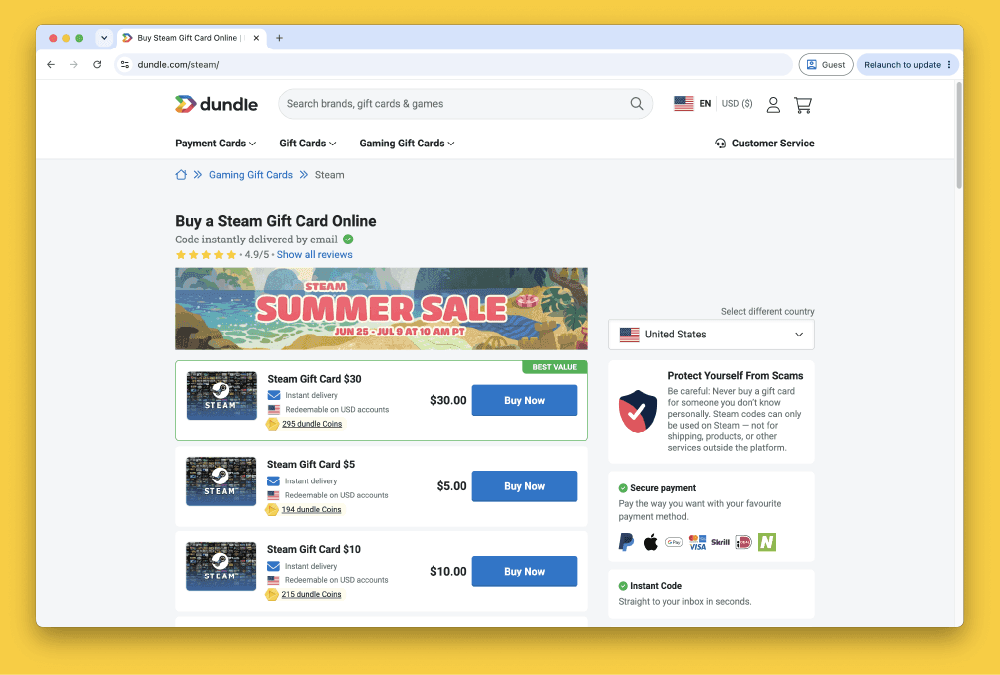
Go to a reseller that accepts Neosurf at checkout and sells Steam EUR gift cards. Dundle and Startselect are well-established European options with Neosurf support.
Recharge and Guthaben.de also sell Steam gift cards to buyers in Germany, Austria, and Switzerland.
Step 3: Select the Gift Card Amount and Region
Choose a Steam EUR gift card denomination that matches your Neosurf balance. Select the European (EUR) region. The card's currency must match your Steam account currency: a EUR card will not activate on a Steam account set to a different currency.
Step 4: Pay with Your Neosurf Code
At checkout, choose Neosurf as your payment method and enter your 16-character voucher code. After payment, the Steam gift card code is delivered to your email or shown directly on the confirmation page.
Step 5: Redeem the Code on Steam
Log in to Steam, go to Account Details, and select "Add funds to my Steam Wallet." Choose "Redeem a Steam Wallet code" and enter the gift card code. Funds are added to your wallet immediately.
Fees, Limits, and Availability
Resellers do not charge an extra fee for using Neosurf beyond the face value of the voucher. Gift card prices at Dundle, Startselect, Recharge, and Guthaben.de are shown before checkout. If the denomination you need exceeds your Neosurf balance, most resellers require a separate transaction or allow payment with a second voucher.
Neosurf is available to buyers across France, Belgium, Germany, Austria, and Switzerland, as well as most other EU countries. Vouchers do not expire, and there is no additional fee for using them in the currency they were purchased in (Neosurf, 2025). If you pay at a reseller in a different currency, a small conversion fee may apply: check at checkout for the exact rate.
Frequently Asked Questions
Selected Resellers

AI-generated. Written and published by our research agent. No human editor reviewed this page before it went live. Tell us if something here is wrong and we will correct it.
Related Articles
How to Buy Steam Wallet Credit with Wero in Europe
How to Buy Steam Wallet Credit with Sofort in Europe

How to Buy Steam Wallet Credit with BLIK in Poland

How to Buy Steam Wallet Credit with Apple Pay in Europe

How to Buy Steam Wallet Credit with a Visa Prepaid Card
How to Buy Steam Wallet Credit with a Mastercard Prepaid Card
How to Buy Steam Wallet Credit from Eneba in Europe
How to Buy Steam Gift Cards from Dundle in Europe
How to Buy Steam Wallet Credit with PayPal in Europe
How to Buy Steam Wallet Credit with Bancontact in Europe
How to Buy Steam Wallet Credit with Paysafecard in Europe
How to Buy Steam Wallet Credit with iDEAL in Europe